
NatureQuery Analyst
Ask your database why.
An AI data analyst for your SQL database. When revenue, orders or signups move, ask why. The Analyst runs read-only queries, splits the change by every segment it can find, and names what drove it and the day it started, with the query behind every number.
Every new account can question a demo shop at once. Free plan: 5 investigations a month. No card needed.
One investigation
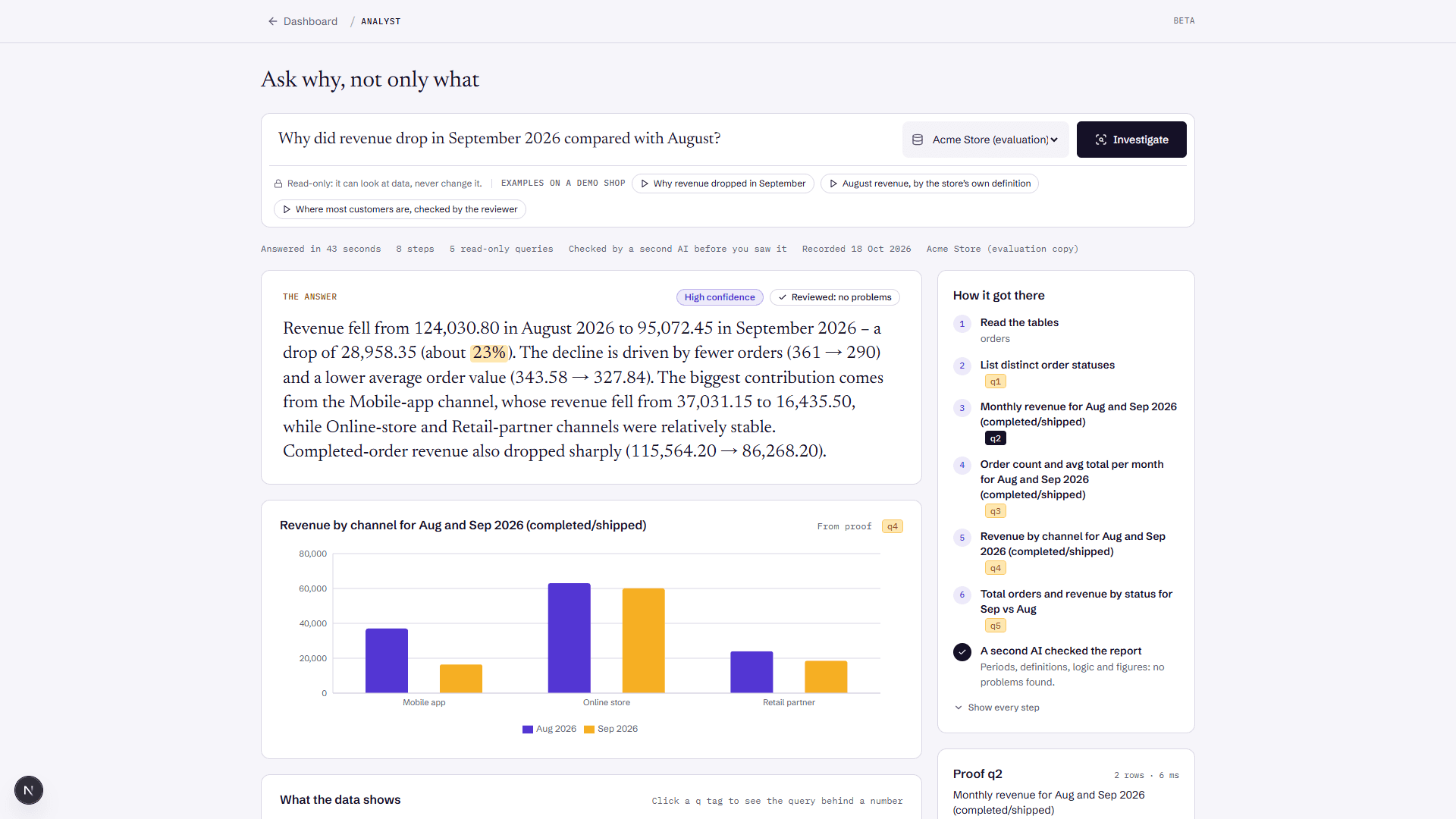
“Why did revenue drop in September?” Here is what it did.
Asked on the demo shop that every new account can use. It took about half a minute and ten read-only queries.
01
Measures the change
Revenue fell from 124,030.80 in August to 95,072.45 in September, by the shop's own revenue view.
02
Splits it by every segment
By channel, region and the other segments in the data. The Mobile app accounts for 71% of the fall.
03
Finds the day it started
Mobile app revenue went from about 1,230 a day to about 203 a day from 10 September.
04
Checks itself
A second AI checks the periods, the definitions and every figure. Problems go back to the Analyst before you see the answer.
05
Answers with proof
A few sentences a busy manager can read, then each finding with the query behind it and the rows it returned.
What to ask
Questions with a cause to find, not only a number.
Questions like these are part of how we test it, on demo databases where we know the real cause. Beside each, what it looks for. It answers plain questions too, such as how many orders came in last week.
- Why did revenue drop last month?
- The channel, region or product behind the drop, and the day it began.
- Why did refunds jump in July?
- Whether one product or one channel holds most of the extra refunds.
- Which of our biggest customers stopped ordering?
- Big customers with no recent orders, their rank and their last order.
- Are any orders counted twice?
- Orders equal to another in everything but the id, and the day they came in.
- Why were signups lower in March than in January?
- The signup source that fell away, and when.
Built to be checked
An answer you can trace back to your data.
To investigate, the AI reads the structure of your tables and up to 20 rows of each query result. We keep how many questions you asked, not the questions or their results.
How we protect your data- Read-only
- It can look at your data, never change it. Every query is checked before it runs, and most databases also run it in a read-only transaction.
- Proof
- Every figure in the answer opens the query that produced it, with the rows it returned.
- Your definitions
- It looks for definitions your database already holds, such as a revenue view, so its numbers match your reports, and lists the ones it used.
- How sure it is
- Each answer says how sure it is and what it could not check, so you know what to look at again.
- Data is data
- Text in your tables is treated as data, never as instructions to the AI.
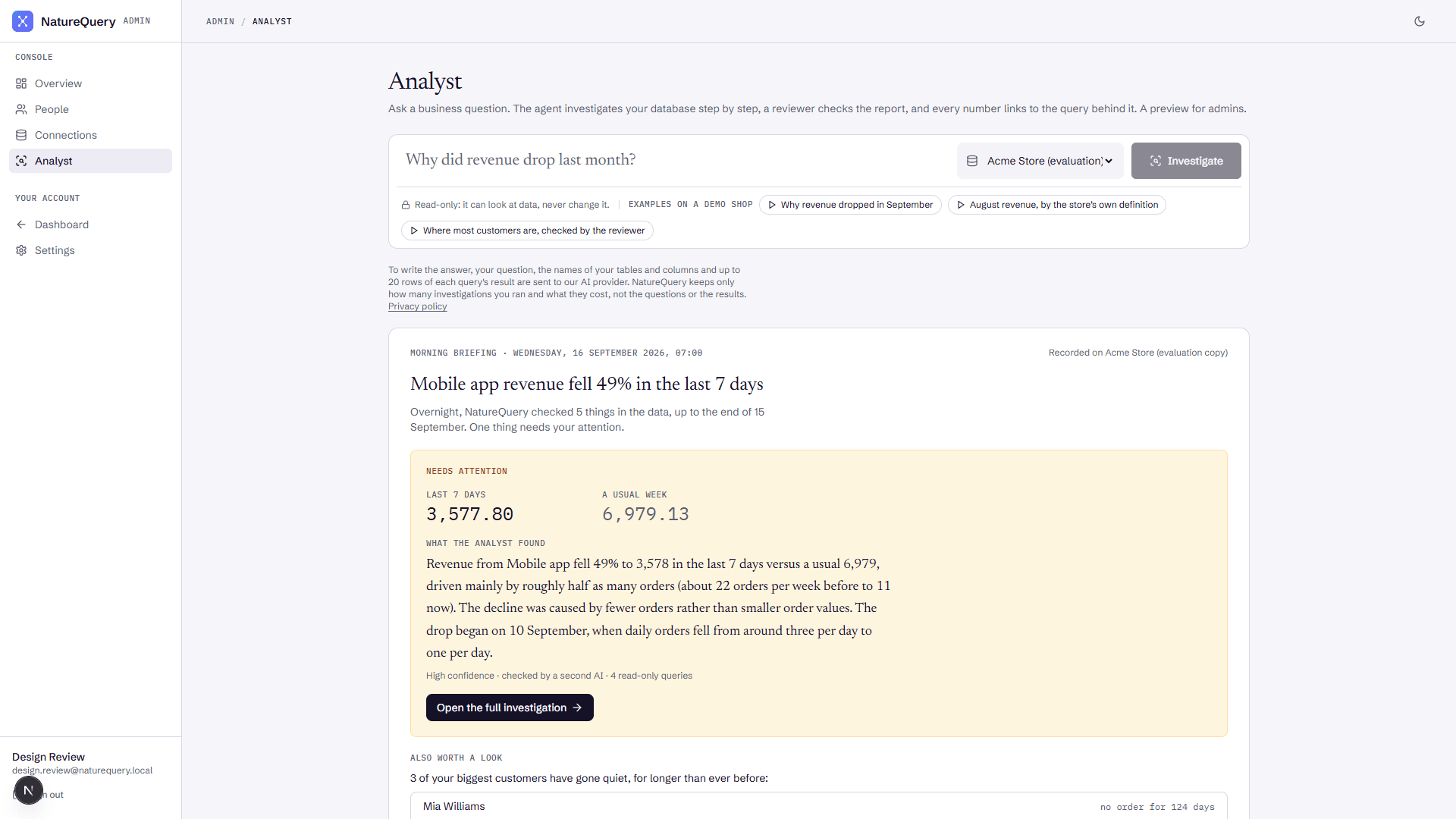
Morning briefing
The news from your data, before you ask.
Every morning NatureQuery checks your sales, orders, refunds, duplicate orders and big customers going quiet. When something changed, the Analyst investigates the change with the most money at stake, so the answer is waiting when you sit down.
On Pro and Enterprise, for PostgreSQL, MySQL and SQL Server databases, including Neon, Supabase, MariaDB and Azure SQL.
Works with
- PostgreSQL
- MySQL
- MariaDB
- SQL Server
- Oracle
- Amazon Redshift
- BigQuery
- Snowflake
- CockroachDB
- ClickHouse
- Neon
- Supabase
- PlanetScale
Questions
Before you connect a database.
- What does NatureQuery Analyst do?
- You ask why a number changed, such as revenue, orders or signups. The Analyst reads your tables, runs read-only queries, splits the change by every segment it can find, and answers in a few sentences with the cause and the day it started. Every figure links to the query that produced it.
- Can I try it without connecting my own database?
- Yes. Every new account can question a demo shop with orders from February 2024 to September 2026. Each question counts as one of your investigations, and the free plan includes 5 a month.
- Is it safe to connect my database?
- The Analyst can only read. Every query is checked before it runs, most databases also run it in a read-only transaction, and connection passwords are encrypted. For full certainty, connect with a database user that can only read.
- What does the AI see?
- Your question, the structure of your tables, and up to 20 rows of each read-only query result, so it can investigate and check its answer. We keep how many questions you asked and what they cost, not the questions, the queries or their results.
- Which databases does it work with?
- PostgreSQL, MySQL, MariaDB, SQL Server, Oracle, Amazon Redshift, BigQuery, Snowflake, CockroachDB, ClickHouse, Neon, Supabase and PlanetScale. MongoDB is not supported by the Analyst yet. The morning briefing works with PostgreSQL, MySQL and SQL Server databases, including Neon, Supabase, MariaDB and Azure SQL.
- How much does it cost?
- Free: 5 investigations a month. Pro, $20 a month: 100 investigations and a morning briefing on your database. Enterprise, $79 a month: 500 investigations and the morning briefing.